- Home
- Resources
Specifications and technical
information for DuxNet products.
Find the latest available firmware
for supported DuxNet products.

Got a DuxNet question? Start here.
Find quick answers about DuxNet products, Cloud management, technical support, warranties and more. For model-specific information, visit the relevant product page or download the product datasheet.
- GENERAL
- DUXNET CLOUD
- SUPPORT & WARRANTY
- SWITCHES
- INDUSTRIAL SWITCHES
- SOLAR SWITCHES
- WI-FI
- SERVICE GATEWAYS
DuxNet is the in-house networking brand of Duxbury Networking, offering a growing range of switches, Wi-Fi, optics, PoE injectors and supporting network infrastructure for environments ranging from home and SMB networks to enterprise, industrial and remote deployments.
DuxNet products are available through Duxbury Networking’s reseller network. If you need help finding a reseller or identifying the right product for your requirements, contact the Duxbury Networking team.
No. The DuxNet website is a product and technical resource platform rather than an ecommerce store. Product pages provide specifications, datasheets, firmware and other information to help you select the right solution before purchasing through the reseller channel.
Start by browsing the relevant product category and use the available filters to narrow your options. Datasheets provide detailed specifications, while the DuxNet Best Practice Guides offer practical guidance around network planning and deployment. If you still need help, contact the Duxbury Networking team.
DuxNet Cloud is a cloud-based network management platform that provides centralised visibility and control of compatible DuxNet Premium devices. It allows networks to be deployed, configured, monitored and troubleshot remotely, with features including network topology views, device-level insights and role-based user access.
DuxNet Premium products include Cloud management as standard, without additional controllers or recurring licence costs.
No. DuxNet Cloud is available on the DuxNet Premium range. Look for the Cloud Managed indicator on the individual product page.
For most compatible DuxNet switches purchased before 1 February 2026, DuxNet Cloud can be enabled through a firmware upgrade. Customers should contact support@duxnet.co.za to confirm compatibility for their specific model.
Yes. DuxNet Cloud is designed for centralised management across multiple sites, allowing compatible devices and network environments to be viewed and managed through one platform.
Yes. DuxNet products are backed by free telephonic technical support, giving customers and resellers access to local technical expertise when assistance is required.
DuxNet products are backed by a Limited Lifetime Warranty, subject to the applicable warranty terms. For DuxNet switch products, the product lifetime is defined as the period during which the product remains active and is sold by the distributor. Discontinued products receive an additional one-year warranty, while external power supplies carry a one-year warranty.
The Limited Lifetime Warranty applies to the original purchaser. A valid product serial number and original proof of purchase are required when requesting warranty support.
No. Power surges and lightning strikes are specifically excluded from the Limited Lifetime Warranty. Damage caused by misuse, faulty installation, unauthorised repair or modification is also excluded.
Selected DuxNet switches include four DIP-switch operating modes that allow you to change how the switch behaves for specific applications:
- VLAN – isolates all ports from one another, allowing communication only with the uplink port.
- AI Extend – extends transmission distance up to 250 metres at 10 Mbps.
- AI PoE – automatically restarts a connected PoE device if no data passes through the port for a set period.
- AI QoS – prioritises network bandwidth for selected traffic.
The available modes vary by model, so always check the product datasheet before changing the DIP switch settings.
Simply put, a managed switch can be configured and monitored, while an unmanaged switch works out of the box with no configuration required.
DuxNet Industrial Switches are designed for more demanding environments than conventional network switches. Their ruggedised construction is designed to withstand extreme temperatures, vibration and electromagnetic interference, while selected managed models also provide advanced management and security functionality.
They are suited to installations where environmental conditions may be more demanding, including industrial and warehousing environments, equipment cabinets and other locations exposed to greater temperature variation, vibration or electromagnetic interference.
Selected industrial models are specified for operating temperatures from -40°C to 75°C.
DuxNet Solar Switches are designed for networking environments where conventional mains power is limited or unavailable. They combine Ethernet connectivity, fibre uplinks, PoE and solar/battery power options, making them particularly relevant to remote and off-grid deployments.
This varies according to the model. For example, selected 5-port models support 12V or 24V solar or battery input, up to 400W solar input and 12V/24V lead-acid or lithium batteries up to 50Ah. The DUX106SPS15A is listed with up to 800W solar input and batteries up to 500Ah.
The recommended solar and battery configuration depends on the DuxNet switch model and the total power requirements of the connected devices. Refer to the product datasheet for supported limits or contact DuxNet technical support for assistance with your deployment.
Yes. Where the model uses DIP switches for power or operating-mode selection, the required settings should be confirmed before connecting the battery or solar input. Incorrect settings may affect how the switch powers or manages connected devices.
Always refer to the model-specific installation instructions before applying power.
The layout of the DIP switches may vary from model to model. We recommend powering of the switch before making changes to the DIP switch.
POWER ON – Equipment power witch
LA | LI – Battery type(Lead Acid or Lithium)
12V | 24V – Battery Voltage
14.8V | 29.6V – Lithium iron phosphate switch
DuxNet offers indoor and outdoor Wi-Fi access points, including a Premium Wi-Fi 6 range with built-in DuxNet Cloud management. The Premium range is designed for centralised management across indoor, outdoor and multi-site environments.
Yes. DuxNet Premium Access Points include DuxNet Cloud management as standard, allowing compatible APs to be configured, monitored and managed centrally without additional controllers or licences.
Yes. DuxNet Premium switches and Premium Wi-Fi products can be managed through DuxNet Cloud, providing a centralised view across the network. This is particularly useful for multi-site deployments.
Yes. The DUX610CAP, DUX625CAP, DUX610APO and DUX625APO all support mesh, helping extend wireless coverage where a fully cabled deployment may not be practical.
Indoor access points are designed for internal environments, while DuxNet outdoor access points are built for exposed installations and feature weather-resistant enclosures. Depending on the model, outdoor units carry IP65 or IP67 ratings.
Yes. DuxNet Wi-Fi includes PoE-powered access points, helping simplify installation by carrying power and network connectivity over the Ethernet connection. The required PoE standard varies by model, so the relevant product datasheet should be checked before installation.
This depends on the access point, installation environment, client devices and network conditions. Published range and user figures should therefore be treated as guidelines rather than guaranteed performance; the DuxNet datasheets specifically note that real-world coverage, transmission rates and connected-device capacity can vary according to environmental and network conditions.
The right access point depends on whether the deployment is indoor or outdoor, the required coverage area, expected number of users, uplink capacity and how the network will be managed. Compare the specifications on the individual product pages or contact DuxNet technical support for assistance selecting the appropriate model.
A DuxNet Service Gateway is a flexible x86-based edge computing appliance designed to support a range of network services and applications. It can be used for functions such as firewall, SD-WAN CPE, IP PBX, routing and other edge computing requirements.
Depending on the model and software configuration, DuxNet Service Gateways can support applications such as firewall, VPN, network security, routing, network server functions, SD-WAN CPE and IP PBX.
The right model depends on the processing power, memory, storage and network interfaces required for the application. The range includes the DSG350, DSG365 and DSG770, with processor options ranging from Intel Celeron to Intel Core i5 and i7.
Yes. Depending on the model, the range supports Gigabit Ethernet and, on selected models, 2.5GbE connectivity. For example, the DSG365 includes six 10/100/1000/2500 Mbps LAN interfaces.
Yes. Selected models support expandable memory, storage and additional interfaces through options such as M.2 and Mini PCIe slots. The available expansion options vary by model, so refer to the individual product specifications before deployment.
The DuxNet Service Gateway datasheet lists Free Telephonic Support and a Limited Lifetime Warranty across the range.
Best Practice
As a best practice, allow around 10–20% headroom in your PoE budget for growth and fluctuations. Always check both the switch’s total PoE budget and any per-port limitations rather than designing to maximum capacity.
Poor switch placement can contribute to overheating, cable strain and difficult maintenance. Keep switches accessible, allow adequate airflow around the unit and avoid sealed cabinets without suitable ventilation or stacking switches on other heat-generating equipment.
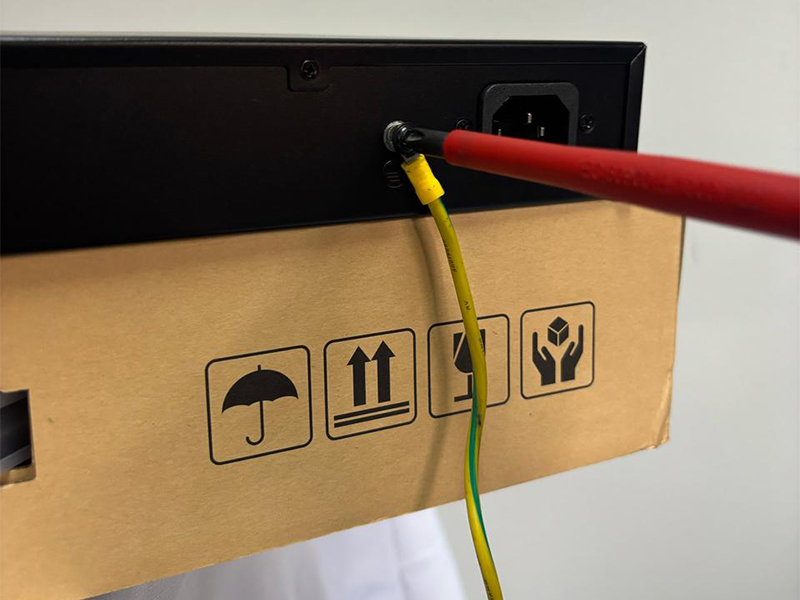
Yes. Proper grounding is important for the switch’s built-in surge protection to function as intended. This is particularly relevant in environments exposed to thunderstorms, power surges, outdoor cabling or nearby electrical equipment.
Choose the AP location according to where users and devices need coverage, rather than simply where cabling is easiest. Keep APs away from cupboards, metal ceilings, thick walls and other major obstructions wherever possible.
Mesh is useful where cabling is difficult or costly, but it should not automatically replace wired backhaul. The DuxNet Best Practice Guide recommends wired backhaul for critical areas and using mesh where it solves a specific coverage challenge.
Not necessarily. SFP selection needs to take device compatibility, fibre type, speed, wavelength, distance and coding into account. Where possible, use identical SFP specifications at both ends of the link and confirm compatibility before deployment.
Not necessarily. A link that does not come up can be caused by SFP compatibility, incorrect specifications or a problem elsewhere in the fibre path.
Check that:
- both ends use compatible SFP specifications;
- the correct fibre type is being used;
- fibre polarity is correct;
- connectors are clean; and
- the fibre cable itself is not damaged or faulty.
If possible, swap the SFP with a known working unit and test the fibre path before assuming the module has failed.
If I upgrade to a faster switch, will the whole network automatically become faster?
No. Faster access ports can simply move the bottleneck further upstream if the uplinks, optics, fibre or other infrastructure cannot carry the additional traffic. Uplink capacity should therefore be planned as part of the overall network path. DuxNet Best Practice Guide to U
The Best Practice Guide recommends using the latest stable firmware before deployment, testing updates in a controlled environment first and downloading firmware only from official, verified sources.
Yes. Create a full configuration backup after setup and before making firmware changes so that you have a known restore point if something goes wrong.
Yes. The DuxNet Best Practice Guide recommends keeping guest traffic away from internal systems and devices, and confirming that guest isolation works correctly after deployment.
No. VLAN segmentation does not automatically mean complete isolation. Where VLANs communicate through a router or firewall, the required traffic should be defined and access controlled accordingly. DuxNet Best Practice Guide VLAN.
Yes. Poorly managed cabling can contribute to interference, restricted airflow, cable damage and accidental disconnections. DuxNet recommends separating power and data where possible, avoiding tight bends and excess coiled cable, and labelling both ends of every cable.